Showing posts with label Condor XC-Mini Plus. Show all posts

5/17/2023

Xhorse Condor “Learn Failed 12 Probe Detected”

 Problem: 

I have a problem with my Xhorse Condor xc-mini plus key cutting machine. It won’t cut key, giving me error “Learn Failed 12 Probe Detected”. How to fix it?

Xhorse Condor “Learn Failed 12 Probe Detected” 1


Solution:

There is a short circuit, open the LED lampshade to clean up the iron filings.

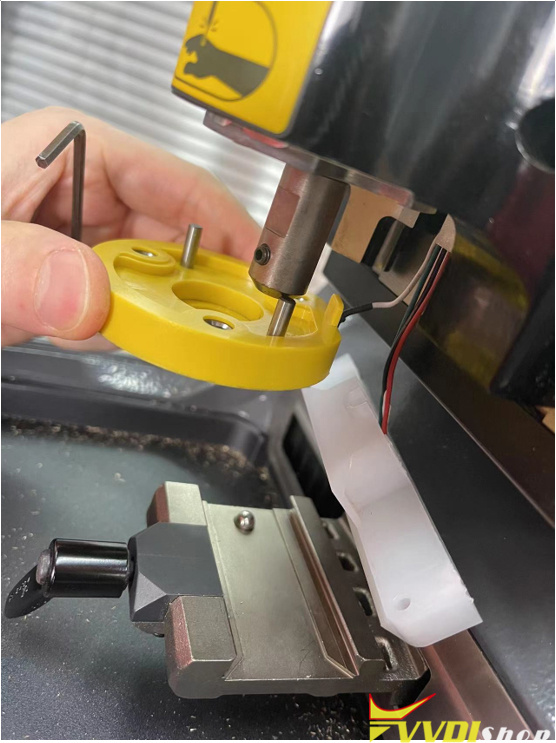
Disassemble the probe base, follow Step 4-Step 6 here to clean up this part, and check whether the wiring harness is damaged.

Xhorse Condor “Learn Failed 12 Probe Detected” 2

1/19/2022

How to Connect Xhorse Condor/Dolphin with Key Reader?

 Question: how to connect the new xhorse dolphin xp005l with key reader?


Here’s the tips to connect xhorse key reader with condor/dolphin key cutting machine:

Dolphin XP005Dolphin XP005LCondor Mini Plus connects key reader via Xhorse app on mobile phone

The new Condor XC-Mini Plus II connects with key ready directly without mobile phone.


Connect key reader with Xhorse App via WiFi or Bluetooth:

Turn on both xhorse key reader and dolphin/condor
Turn on Bluetooth connection on xhorse app
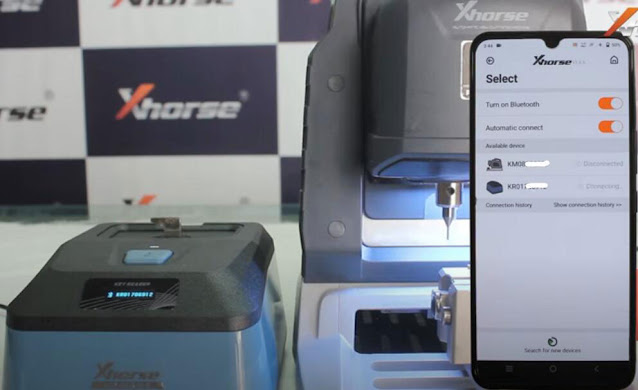
In xhorse dolphin/condor app, press Select, let it seach devices. You will see 2 devices are connected
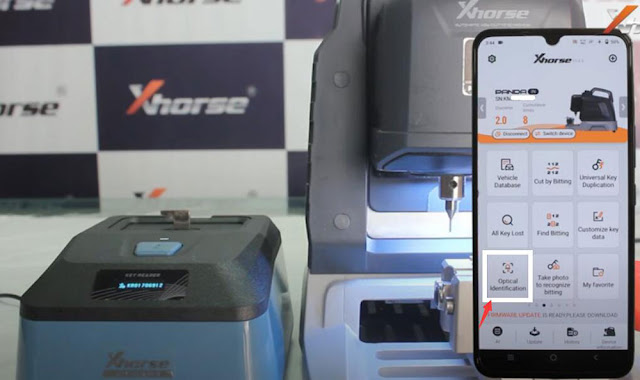
Select Optional identification function in the Xhorse app
Select brand and start using key reader

Connect Xhorse Condor/Dolphin with Key Reader 1

Connect Xhorse Condor/Dolphin with Key Reader 2

Connect Xhorse Condor/Dolphin with Key Reader 3

Demo guide & review: http://blog.vvdishop.com/xhorse-key-reader-review-identify-7-car-keys-fast/

Connect key reader with Condor II within machine instruction will be updated soon.

11/28/2021

Xhorse Condor XC-Mini Plus II New Feature

 New generation key cutting machine developed by Xhorse is released recently. As upgrade version of Condor Mini Plus, what’s new in Xhorse Condor XC-Mini Plus II?


New Features

  1. Multi-Purpose Clamps

Condor XC-Mini Plus II is equipped with M5 and M3 Clamp in standard. M1, M2, M4 Clamp for options.

Thereinto, M5 is a 2-in-1 clamp of M1&M2, supports 2 track external, channel track, standard single sided, 4 track external, 4 track internal, standard double sided, dimple key types. More convenient to switch M1&M2 clamps directly, no need to install or disassemble over and over.

M3 Clamp supports Ford F201 & Citroen SX9 key types.

M4 Clamp supports residential keys including single/double sided & crucifix keys.

xhorse-condor-xc-mini-plus-new-feature-1

xhorse-condor-xc-mini-plus-new-feature-2

  1. Intelligent indicator lights

Condor XC-Mini Plus II is assembled by advanced LED chips and lamp shade, seamlessly automates 3 colors with the change of real-time working status. Ensure a stable light source and intelligent status indication with flicker-free illumination and long service time.

Read light – error warning

Blue light – normal working

Yellow light – info notification

xhorse-condor-xc-mini-plus-new-feature-3


  1. 8-core processor

Condor Mini Plus II is driven by high performance 8-core processor, to realize prompt response, run faster and high resolution.

xhorse-condor-xc-mini-plus-new-feature-4


  1. Key Blank Engraving

In case there are too many keys hard to classify, or if you would like a key with unique design. This function allows users to add and delete texts and pictures, resize and turn them, to perfectly design a unique key.

xhorse-condor-xc-mini-plus-new-feature-5

Other Features

  • 2-in-1 tool to help decode and cut key when all keys lost.
  • All key lost database covering 100 car brands, 2000 car models & 20000 keys.
  • 7” angle-adjustable touch screen offers better picture quality & convenience.
  • Support multiple types of keys: including automobile, motorbike, residential and other general keys.
  • Offline operation available.
  • Key bitting recognition: should work with Xhorse Key Reader.
  • Smart APP control via WiFi or Bluetooth.
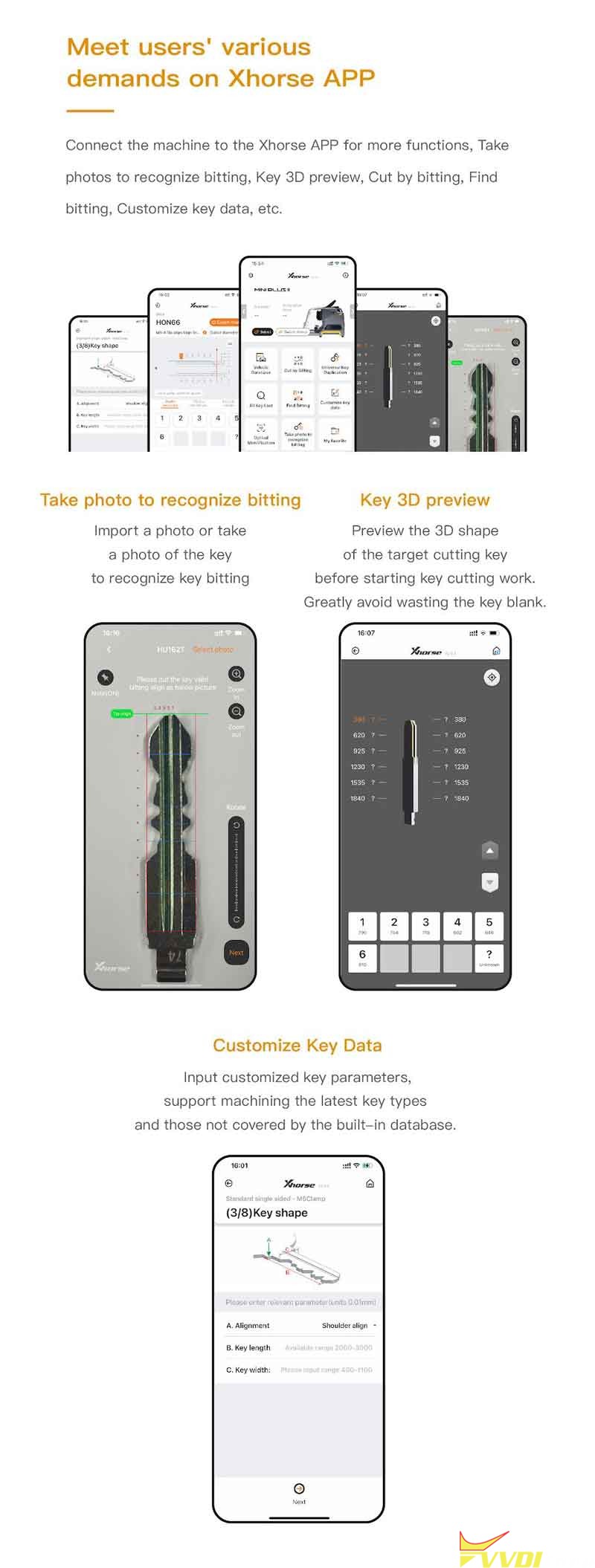
  • Take photo to recognize bitting.
  • Key 3D preview.
  • Customize key data.
  • Life-long free online technical support.

xhorse-condor-xc-mini-plus-new-feature-6

xhorse-condor-xc-mini-plus-new-feature-7

xhorse-condor-xc-mini-plus-new-feature-8

xhorse-condor-xc-mini-plus-new-feature-9

More info about to be updated…

www.vvdishop.com

10/20/2021

Xhorse Condor Mini Plus Cut HU100 too Short?

 Problem:

Just started using a xhorse condor xc-mini plus and I’m having problems. It’s cutting the key blanks too short so they work in the door lock but not in the ignition if that makes sense. I just read a hu100 lock (8 cuts its a 2010 corsa) then I got the original key and copied it on the machine both numbers match I then cut the blade and its approx 1 cm short of the original cut. Any idea how to fix it?

xhorse-condor-mini-plus-cut-hu100-too-short

Suggestion:

1)

Ignition 10 cut, door locks 8 cut. Your 2 bits short on the ignition.

Choose HU100 10 cut. Not 8 cut. Leave 2 blank.
2)

If not calibration check thickness of blank .
Had it the other day cut 1 with xc mini and one manual still same.
Both worked in lock but not ignition.
Turned out to be the thickness of the blank.

www.vvdishop.com

9/27/2021

Xhorse Condor XC-Mini Plus Copy Toyota TOY41R Key

 How to use Xhorse Condor XC-Mini Plus to copy a new Toyota TOY41R key? Following I’ll perform “Cut by bitting” to demonstrate how to do.


I have 2 keys at hands: an original working key & a new blank key.


Fix the original key firmly on M1 clamp, press

Key Dadabase >> Cut by bitting >> TOY41R >> Toyota >> Key decode >> Confirm

Xhorse Condor XC-Mini Plus Copy Toyota TOY41R Key 1

Xhorse Condor XC-Mini Plus Copy Toyota TOY41R Key 2

Xhorse Condor XC-Mini Plus Copy Toyota TOY41R Key 3

Xhorse Condor XC-Mini Plus Copy Toyota TOY41R Key 4

Xhorse Condor XC-Mini Plus Copy Toyota TOY41R Key 5

Xhorse Condor XC-Mini Plus Copy Toyota TOY41R Key 6

Condor XC-Mini will start decoding automatically…


Once done, I can find the bitting codes of key on Condor Mini tablet screen.

Compare to the original one, they are exactly same.


Next step, install the blank key to be cut on clamp.

Press “Cut key”.


Condor Mini Plus machine will automatically starts working again.

This time it’s cutting…

Xhorse Condor XC-Mini Plus Copy Toyota TOY41R Key 7

Xhorse Condor XC-Mini Plus Copy Toyota TOY41R Key 8

Xhorse Condor XC-Mini Plus Copy Toyota TOY41R Key 9

Xhorse Condor XC-Mini Plus Copy Toyota TOY41R Key 10

Just wait until the job finished.


Take out the new key to have a check.

It is same as the original key, and it does work.

Done!


Incredible, how smart and fast the Xhorse Condor machine is. It took me less tan 3 minutes to cut a key. I’ll recommend each locksmith should have one.

https://www.vvdishop.com/

6/10/2021

Duplicate Toyota Corolla -2005 Key by Xhorse Condor Mini Plus

 The original key of Toyota Corolla (after 2005) is broken, so I’m gonna copy a new one via Xhorse Condor XC-Mini Plus key cutting machine.

xhorse-condor-mini-plus-Toyota-Corolla-1

Fix the original key on clamp, press on tablet screen,

Key duplication >> Toyota >> Corolla >> Gen 10/ E140/ E150(after 2005) >> Confirm >> Key decode >> Confirm


Condor XC-Mini machine starts decoding…

xhorse-condor-mini-plus-Toyota-Corolla-2

xhorse-condor-mini-plus-Toyota-Corolla-3

xhorse-condor-mini-plus-Toyota-Corolla-4

xhorse-condor-mini-plus-Toyota-Corolla-5

xhorse-condor-mini-plus-Toyota-Corolla-6

xhorse-condor-mini-plus-Toyota-Corolla-7

Key bitting codes have been read out: 33 23 44 22 33


Remove the original key to fix a new key blank on clamp.

Put down the cover.

Press “Cut”.


Condor Mini Plus Machine starts cutting the key…

Wait until cutting finished.

It takes only about 3 minutes.


Completed!

Clean the clamp and take out the key to have a try.

It can open the vehicle door lock.

xhorse-condor-mini-plus-Toyota-Corolla-8

xhorse-condor-mini-plus-Toyota-Corolla-9

xhorse-condor-mini-plus-Toyota-Corolla-10

Key cutting has done!


This is using Xhorse Condor XC-Mini Plus automatic machine to duplicate a key for Toyota Corolla successfully.

https://www.vvdishop.com/

5/20/2021

Duplicate BMW 320 E46 Key by Xhorse Condor XC-Mini Plus

 How to duplicate a BMW 320 E46 1999-2006 key by Xhorse Condor XC-Mini Plus key cutting machine?

key cutting BMW 320 E46 xhorse condor mini-1


Fix the original BMW key on clamp, press

Key duplication >> BMW >> 320 >> E46(1998-2006) >> Confirm >> Key decode

Condor XC-Mini machine will start decoding…

key cutting BMW 320 E46 xhorse condor mini-2

key cutting BMW 320 E46 xhorse condor mini-3

key cutting BMW 320 E46 xhorse condor mini-4

key cutting BMW 320 E46 xhorse condor mini-5

key cutting BMW 320 E46 xhorse condor mini-6

key cutting BMW 320 E46 xhorse condor mini-7

Press “Cut”.

Condor Mini Plus machine will start cutting…


Wait until one side cutting finished, then turn over the key to cut other side.

key cutting BMW 320 E46 xhorse condor mini-8

key cutting BMW 320 E46 xhorse condor mini-9

Done!


Using Xhorse Condor XC-Mini Plus Automatic Machine to copy a 320 E46 BMW key is successful.

https://www.vvdishop.com/