Showing posts with label Dolphin XP005. Show all posts

7/30/2026

Xhorse Dolphin XP005 Battery Not Charging to Full Solution

 Problem:

A user reported that the Xhorse Dolphin XP005 would not fully charge after being left on charge overnight. The battery only reached 3 bars and dropped to 2 bars immediately after powering on.


According to VVDISHOP engineers, this is usually related to the battery’s protection mechanism. First discharge the battery further, then charge it continuously without unplugging it.

Xhorse Dolphin XP005 Battery Not Charging to Full 1

Xhorse Dolphin XP005 Battery Not Charging to Full 2

Solution

  1. Use the Dolphin XP005 until the battery level is lower.
  2. Connect the charger and leave it plugged in continuously without disconnecting it during the charging process.
  3. Check whether the battery can reach full capacity after charging.
  4. If the battery still only reaches about 50% after 12 hours of charging, this is not normal. Disassemble the unit and measure the battery to inspect its condition.
  5. If the issue persists after these checks, contact your dealer or Xhorse technical support for further assistance.


www.vvdishop.com

7/28/2026

Replace Resistor on Xhorse Dolphin Battery BMS Board

If your Xhorse Dolphin XP005/XP005L key cutting machine failed to charge the battery, or Bluetooth connection disconnected during key cutting procedure, first of all do a battery test.


When checking the battery information, both the battery cells and the BMS (Battery Management System) board appear to be functioning properly. This suggests the issue may be related to the resistor on the green BMS board.

Disassemble the battery module and remove the green BMS board.

Replace the 5mΩ battery sampling resistor shown in the picture below with a 2512 package 2mΩ resistor (1W power rating).

Then try again.

Replace Resistor on Xhorse Dolphin Battery BMS Board 1

Replace Resistor on Xhorse Dolphin Battery BMS Board 2

Replace Resistor on Xhorse Dolphin Battery BMS Board 3

Replace Resistor on Xhorse Dolphin Battery BMS Board 4

Replace Resistor on Xhorse Dolphin Battery BMS Board 5


6/11/2026

Xhorse Dolphin XP005 Error Code 6/56/3 Solution

Xhorse Dolphin XP005/XP005L key cutting machine displays error 6/56/3 while decoding or cutting keys, indicating that there is a problem with the conductivity of the machine.

Xhorse Dolphin XP005 Error Code 6/56/3 Solution 1

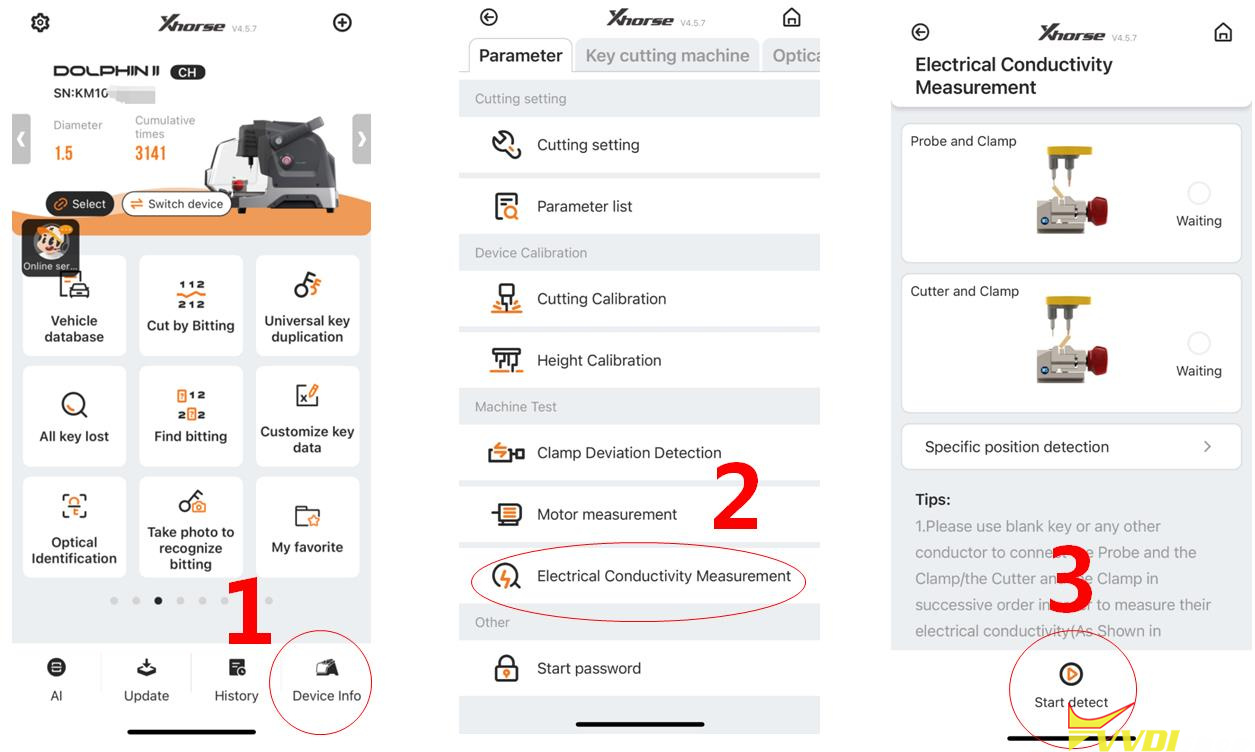
Please follow the steps on the following page to enter the conductivity measurement interface for relevant testing.


Go to Device Info- Electrical Conductivity Measurement-Start Detect.

Xhorse Dolphin XP005 Error Code 6/56/3 Solution 2

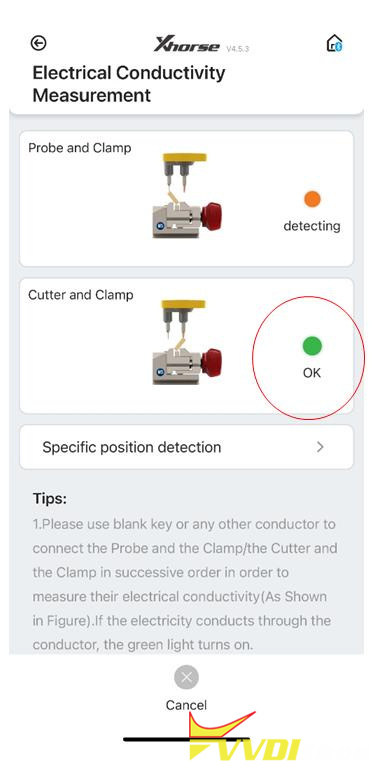
After entering the testing interface, click on start to test. If the connection has not been made according to the prompts on the diagram, the cutter will directly display OK, indicating that the device cutter is in a short circuit state;

Xhorse Dolphin XP005 Error Code 6/56/3 Solution 3

Solution:

If the cutter is in a short circuit condition, first remove the back cover and front cover of the device.

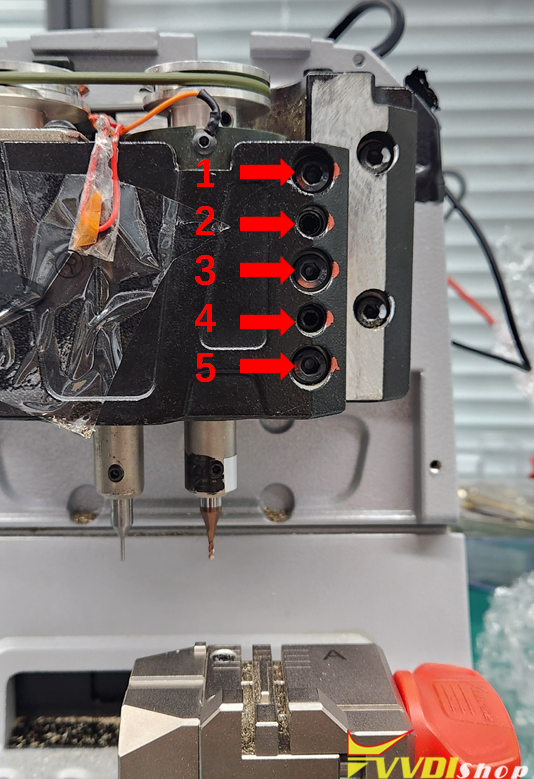
Then turn counterclockwise to loosen the screws 1, 3, and 5 in the figure on the right, and remove these three screws,

Then tighten the screws 2 and 4 in the right figure clockwise, and push open the black metal structural component,

Remove the main axis assembly connected to the cutter again.

Xhorse Dolphin XP005 Error Code 6/56/3 Solution 4

Pull the main axis assembly upwards and observe if the white insulation paper is damaged.

If it is damaged, please replace this insulation paper,

If there is no damage, remove the entire main axis and clean the iron filings inside,

The usual reason is that the cutter is in a short circuit state due to iron filings at the bottom, after cleaning, reinstall the screws, when installing screws, pay attention to the order.

First, loosen the screws 2 and 4 in the diagram on the previous page clockwise, then tighten the screws of 1, 3, and 5.

Xhorse Dolphin XP005 Error Code 6/56/3 Solution 5

www.vvdishop.com

12/11/2025

Xhorse Dolphin XP005 Cut Honda High-security Key Blades

 With the rise of advanced tools like the Xhorse Dolphin XP005 key machine, controlled conveniently via smartphone, decoding and cutting these keys has become more efficient—but knowing the nuances can make all the difference.


Here is an example of cutting a 2023 Honda Odyssey with high-security blades, such as the HON66GP. This blade style has been used by Honda from the early 2000s up to recent models, making this knowledge relevant across many years and models.


Understanding the Cuts

The Honda high-security key features six cuts on the top and six on the bottom, and they are not identical. One of the most critical tips shared is about the very tip of the key:

  • Both cuts at the far right tip are always ones.
  • This is consistent across all Honda high-security keys of this type. No matter what key you decode, the two cuts at the tip on the top should always be 1.

But the real insight comes with the second cut from the right on the top row:

  • If it’s a 5, you’re dealing with a master key.
  • If it’s a 2, it’s a valet key.

Xhorse Dolphin XP005 Cut Honda High-security Key Blades 1

Xhorse Dolphin XP005 Cut Honda High-security Key Blades 2

Xhorse Dolphin XP005 Cut Honda High-security Key Blades 3

Valet keys function like regular keys but with one limitation: they cannot lock or unlock the glove box. This small detail can help you identify if a customer’s key was originally copied from a valet key. The good news? If you decode a key and find a 2 where a 5 should be, you can simply change it to a 5 to upgrade it to a master key.


Decoding and Cutting in Practice

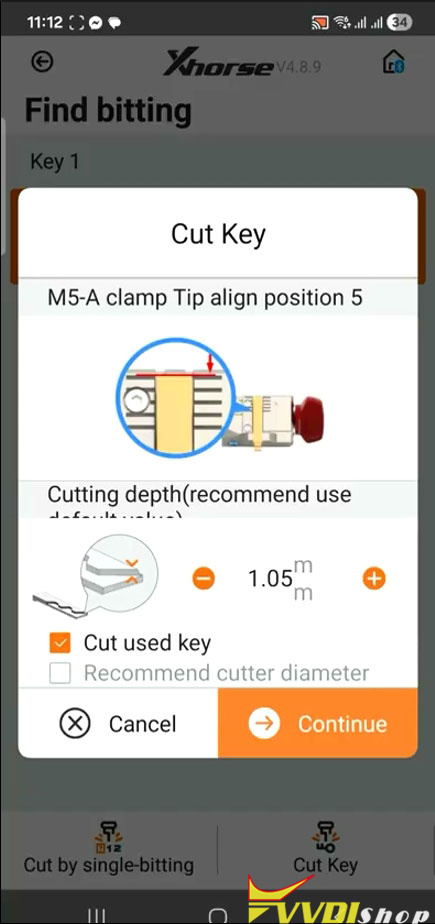
After decoding the cuts using the Xhorse Dolphin app, hitting “Find Bitting” will search and return a key code.This method has never failed to produce a working key—a testament to the software’s reliability.

However, when it comes to cutting, there’s a useful adjustment to ensure smooth operation:

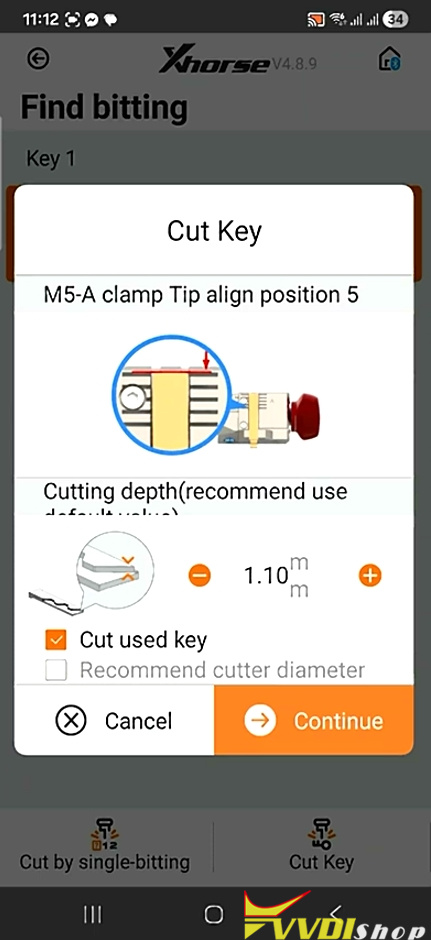
The app typically recommends a cutting depth of 1.05 mm. But sometimes, keys cut at this depth can feel stiff or hard to insert and turn in the lock. To avoid this, the locksmith advises increasing the depth slightly to 1.10 mm. This small adjustment has proven to eliminate insertion issues without compromising the key’s function. Both sides of the key should be cut the same way for consistency.

Xhorse Dolphin XP005 Cut Honda High-security Key Blades 4

Xhorse Dolphin XP005 Cut Honda High-security Key Blades 5

Final Thoughts

Honda’s high-security keys might seem daunting at first, but with the right tools and knowledge, they become straightforward. Remember:

  • Tip cuts are always 1.
  • Second cut: 5 for master, 2 for valet.
  • Adjust cutting depth to 1.10 mm for smoother operation.


By mastering these details, you can provide faster, more reliable service to your customers—and turn a complex task into a routine job.

11/19/2025

Xhorse Dolphin XP005 Cut SC1 Key Blank by Numbers

 Question:

Can a SC1 blank be cut by numbers with the Xhorse dolphin xp005 key cutting machine? Have the M4 clamp. But I only have numbers to work with. No original keys.

Xhorse Dolphin XP005 Cut SC1 Key Blank by Numbers 1

Solution:

Yes, Xhorse Dolphin will cut SC1 household key blank by numbers.

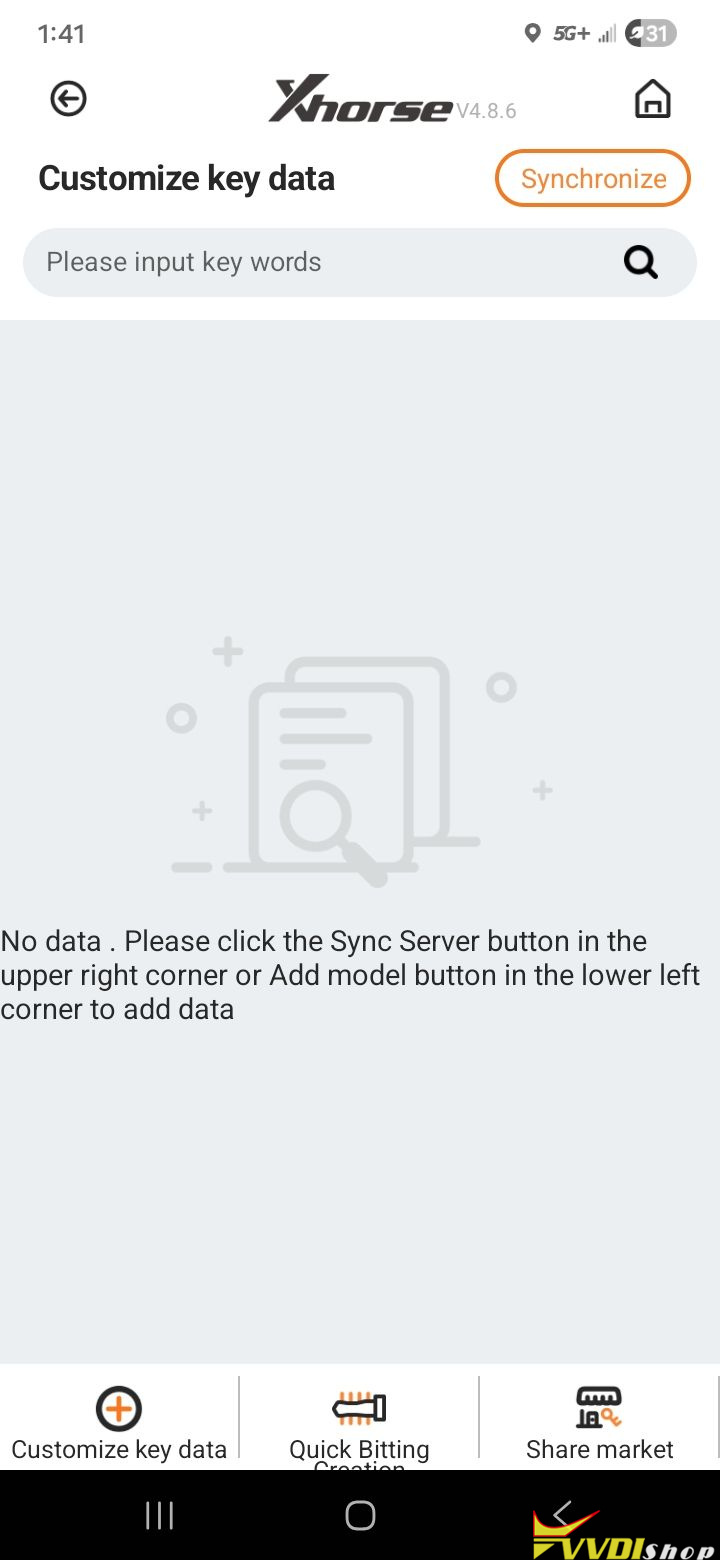
The 10 depths are 0-9 for a sc1. On the dolphin you can’t use 0. This means that you must input all 1 digit higher…a 0 is inputted as a 1….1=2…so on…9=10
Input these screen shots under custom key data and this should work for you. Just when put key on m4 clamp, align shoulder to the clamp. Do not use the spacer.

Just search for depth and space charts and convert to mm if it’s in inches..and plug values in.

Xhorse Dolphin XP005 Cut SC1 Key Blank by Numbers 2

Xhorse Dolphin XP005 Cut SC1 Key Blank by Numbers 3

Xhorse Dolphin XP005 Cut SC1 Key Blank by Numbers 4

Xhorse Dolphin XP005 Cut SC1 Key Blank by Numbers 5

Xhorse Dolphin XP005 Cut SC1 Key Blank by Numbers 6

Xhorse Dolphin XP005 Cut SC1 Key Blank by Numbers 7

Xhorse Dolphin XP005 Cut SC1 Key Blank by Numbers 8

Xhorse Dolphin XP005 Cut SC1 Key Blank by Numbers 9

You can also buy the key profile or do it yourself. Like best keys, sch, kw, y11, y12, and some more.

Xhorse Dolphin XP005 Cut SC1 Key Blank by Numbers 10

Xhorse Dolphin XP005 Cut SC1 Key Blank by Numbers 11


10/09/2025

Tips to Cut PSA HU83 Key with Xhorse Dolphin XP005

 Problem:

When I tried to cut a Citroen Jumpy key with a HU83 blade in my Xhorse Dolphin XP005, I had this problem. It fit properly in the door lock, but not in the ignition cylinder. Afterwards, I looked at the detail in the attached photo. Could this be the reason why the key didn’t fit properly?

Tips to Cut PSA HU83 Key with Xhorse Dolphin XP005

Solution:

The end of the key likely isn’t actually cut properly. If you held the original and new key up together they would be slightly different at the tips/last bitting. Use universal duplication to cut HU83 with extra bitting.
Other people with the same issue. So as long as the machine is calibrated right, it decoded it properly, and the key actually was HU83 and not VA2, then it will just be that same bug, it’s nothing you’ve done wrong apart from maybe not comparing the keys after you cut them.


We’ve experienced the same problem, and the issue lies not with the cut, but with the key not passing dust lid you need to file tip of the key narrow to pass it. Just done the same hu83 for 308 today, file tip a bit and it will work.

7/31/2025

Xhorse Condor Dolphin Clamp Replacement Guide

 Xhorse offers a range of high-quality clamp replacements for their automatic Key Cutting Machines. These precision components ensure accurate key duplication and cutting across various Xhorse models. Below is a comprehensive overview of available clamp replacements and their compatible machines.


Compatible Clamp Models

  • Standard Clamp Replacements
  1. Xhorse M1 Clamp– Compatible with:

Condor XC-Mini (Plus)

Condor Dolphin XP-005


  1. Xhorse M2 Clamp – Works with:

CONDOR XC-MINI

Condor MINI Plus

Condor Dolphin XP-005


  1. Xhorse M3 Clamp– Fits:

Condor XC-MINI

Condor Mini Plus

Dolphin XP005


  1. Xhorse M4 Clamp– Designed for:

Condor XC-MINI

Dolphin XP005


  • Specialized Clamp Options

Xhorse M5 Clamp – Universal clamp for all Xhorse automatic key cutting machines

Xhorse JAW – Specifically for Dolphin XP-007 models


Why Choose Genuine Xhorse Clamp Replacements?

  • Precision Engineering – Ensures perfect key alignment during cutting
  • Durable Construction – Made from high-grade materials for long-lasting performance
  • Perfect Fit – Designed specifically for Xhorse machines
  • Consistent Results – Maintains machine accuracy over time


Installation Tips

When replacing your Xhorse machine clamps:

  1. Always power off the machine before replacement
  2. Clean the clamp area before installing new jaws
  3. Follow manufacturer torque specifications
  4. Test with scrap keys before production use


Where to Purchase

Genuine Xhorse clamp replacements are available through authorized distributors.

For more information, visit www.vvdishop.com.

Xhorse Condor Dolphin Clamp Replacement