11/24/2021

Xhorse Key Reader Identify 7 Car Keys Fast in Secs

 Yesterday I got a new gadget to help read key bitting codes. It is called Xhorse Key Reader blade skimmer. So I just can’t wait to test how many keys it supports to identify. Let’s start!


I can control the small tool through Xhorse Key Reader App on a phone or VVDI Key Tool Max. Anyway, that sounds very convenient. I can also cut a key directly if connecting with a Dolphin XP005 key cutting machine.

Xhorse Key Reader Identify 7 Car Keys Fast  1

Xhorse Key Reader Identify 7 Car Keys Fast  2

Hero Splendor Key Test OK

This is the first key I’m gonna try. It needs to select car model firstly.

Optical identification >> Hero >> Splendor >> OK >> Identification


It’s asked to put the key into Xhorse Blade Skimmer.

Press “Identification” again.

It starts identifying…


Alright, bitting codes were read out in seconds with short beeps.

It’s 12323221, very fast.

Compare the key to the bitting, all the same.

Bitting codes are correct.


If I would like to cut a key, I can press “Cutting key” here to control directly.

But now I would just test the second one.

Xhorse Key Reader Identify 7 Car Keys Fast  3

Xhorse Key Reader Identify 7 Car Keys Fast  4

Xhorse Key Reader Identify 7 Car Keys Fast  5

Skoda HU66 Test OK

Optical identification >> Skoda >> HU66 >> OK >> Identification

Put the second key into Key Reader Blade Skimmer.

Press “Identification” and wait for identifying…


Identification successful.

Bitting codes are 34334421.

Xhorse Key Reader Identify 7 Car Keys Fast  6

Hyundai Gen1(2008-) KIA7 Test OK

Optical identification >> Hyundai >> Gen1(After 2008) >> KIA7 >> OK >> Identification

Read out successfully.

Bitting codes are 132212; 112122.

Xhorse Key Reader Identify 7 Car Keys Fast  7

Honda BRIO Test OK

Optical identification >> Honda >> BRIO >> OK >> Identification

Identification successful.

Bitting codes: 142535; 133153.

Xhorse Key Reader Identify 7 Car Keys Fast  8


Mahindra XYLO&SCORP10 Test OK

Optical identification >> Mahindra >> XYLO&SCORP10 >> OK >> Identification

Identification successful.

Bitting codes: 3313245312.

Xhorse Key Reader Identify 7 Car Keys Fast  9

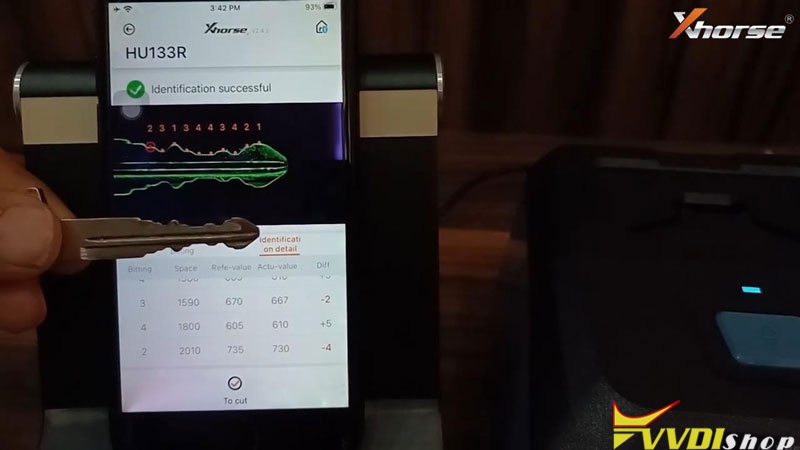
Suzuki Swift HU133R Test OK

Optical identification >> Suzuki >> Swift >> HU133R >> OK >> Identification

Identification successful.

Bitting codes: 2313443421.

Xhorse Key Reader Identify 7 Car Keys Fast  10


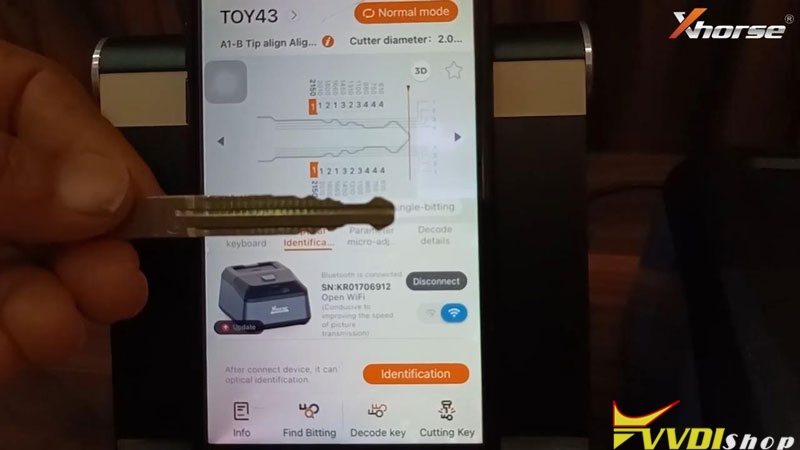
Toyota Corolla TOY43 Test OK

Optical identification >> Toyota >> Corolla >> TOY43 >> OK >> Identification

Identification successful.

Bitting codes: 1121323444.

Xhorse Key Reader Identify 7 Car Keys Fast  11

This is Xhorse Key Reader Review on testing 7 car keys, including Toyota, Suzuki, Honda, Mahindra, Hyundai, Skoda & Hero. All can be read out very quickly in seconds. It’s indeed to save much time if I just decoded by myself.

www.vvdishop.com

11/22/2021

Xhorse Dolphin XP005L Cut Mini Cooper HU100R Key

 Just got a new Key Cutting Machine from Xhorse recently. This is a first Dolphin XP005L Review on how to learn & cut BMW Mini Cooper HU100R key.
 

It came with a protection cover and an adjustable screen. When I turned on the machine, a smart LED indicator lights on.

Xhorse Dolphin XP005L Cut Mini Cooper HU100R Key 1

Xhorse Dolphin XP005L Cut Mini Cooper HU100R Key 2

Go to touch screen tablet,

Vehicle database >> Mini >> All key blank >> HU100R


It turns out that the M5 clamp has 2 sides.

It is asked to rotate M5 clamp side B to tip align No.1 position.

Then fix a working key on.

Xhorse Dolphin XP005L Cut Mini Cooper HU100R Key 3

Xhorse Dolphin XP005L Cut Mini Cooper HU100R Key 4

Xhorse Dolphin XP005L Cut Mini Cooper HU100R Key 5

Xhorse Dolphin XP005L Cut Mini Cooper HU100R Key 6

Xhorse Dolphin XP005L Cut Mini Cooper HU100R Key 7 

OK >> Learn key


Xhorse Dolphin II machine will start decoding automatically…

Decode key complete.


The bitting codes have came out on screen.

Check it with original key.


Fix a new key blank on clamp to ready.

Put down protection shield, press

Cut key >> Cut

Xhorse Dolphin XP005L Cut Mini Cooper HU100R Key 8

Xhorse Dolphin XP005L Cut Mini Cooper HU100R Key 9

Xhorse Dolphin XP005L Cut Mini Cooper HU100R Key 10

Xhorse Dolphin XP005L Cut Mini Cooper HU100R Key 11

Xhorse Dolphin XP005L Cut Mini Cooper HU100R Key 12

Dolphin XP005L starts cutting key…Wait until 100%.

Cutting key completed.


Turn over new key to cut the other side.

Just repeat as before…

Completed!


Compare 2 keys, they are same.

Key cutting has done!

Xhorse Dolphin XP005L Cut Mini Cooper HU100R Key 13

Exactly smart and convenient to control on screen directly. You can also use a Dolphin XP005L App to smart control the machine as well.

www.vvdishop.com

11/10/2021

How to Cut Residential Keys with Xhorse Key Cutting Machine?

 Xhorse Dolphin or Condor key cutting machine is possible to be used to cut household keys. With Xhorse M4 Clamp, it’s allowed to cut single & crucifix residential keys. M4 Clamp can be applied to Dolphin XP005, Dolphin II, CONDOR XC-MINI Plus automatic key cutting machines.


But what’s worth mentioning that M4 Clamp does not support cutting residential keys by code for the moment. You should have the original key to copy.


How to cut residential keys with Xhorse key cutting machine?

This tutorial is taking Dolphin XP005 to cut SC1, KW1 key as an example.


  1. Tighten & install M4 Clamp. Prepare original key & new key, locate the alignment shim.

Cut Residential Keys with Xhorse Key Cutting Machine 1

  1. Go to “Universal Key Duplication >> Standard Single Sided >> Shoulder Align >> M4 Clamp”.

Cut Residential Keys with Xhorse Key Cutting Machine 2


  1. Insert & fix the original key, aligned it according to tips. Press “Decode key”.

Cut Residential Keys with Xhorse Key Cutting Machine 3

Cut Residential Keys with Xhorse Key Cutting Machine 4

  1. Once completed, remove original key and replace the new one as instructed. Press “Cutting key >> Continue”.

Cut Residential Keys with Xhorse Key Cutting Machine 5


Xhorse Dolphin machine will finish the whole process automatically.

Just wait…

Universal key cutting success.

Done!

Cut Residential Keys with Xhorse Key Cutting Machine 6

M4 Clamp can easily decode & cut SC1/KW1 keyways. Only to follow the steps above.


In short, Xhorse Dolphin XP005, Dolphin XP-005L and Condor XC-Mini are able to cut by duplication for single/crucifix house keys.

Cut Residential Keys with Xhorse Key Cutting Machine 7

Cut Residential Keys with Xhorse Key Cutting Machine 8

https://www.vvdishop.com/wholesale/xhorse-key-cutting-machine/

How to Solve Xhorse Dolphin XP005 Error 21?

 Problem:

My Xhorse Dolphin XP005 came as error 21 and break this decoder pin. Any idea?
xhorse-dolphin-xp005l-error-21

Solution:
1. Wrong clamp was used. Check app and make sure use a proper clamp.
2. If clamp is correct, do a height adjustment, it should be fine.
If still have problems, contact us www.vvdishop.com

11/08/2021

Xhorse Dolphin XP005L M5 Clamp Cutting Calibration

 This is a tutorial to show how to do Xhorse Dolphin XP005L M5 clamp cutting calibration for the first time.


Procedure

Step1. Install the milling cutter and probe, tighten the screw after inserting the milling cutter and probe to the top.

Xhorse Dolphin XP005L M5 Clamp Cutting Calibration 1


Step2. Complete the cutting setting.


Press on Dolphin XP005L screen tablet,

System >> Machine Parameter >> Cutting Setting


Select appropriate options for spindle speed, move speed, cutter diameter, LED status, buzzer switch, current clamp.

Press “Save” once done.

Xhorse Dolphin XP005L M5 Clamp Cutting Calibration 2

Xhorse Dolphin XP005L M5 Clamp Cutting Calibration 3

Xhorse Dolphin XP005L M5 Clamp Cutting Calibration 4

Step3. Make sure the key stick to the 3rd mark line.

Go back to Cutting Calibration >> Select Cutter Diameter >> Read tips, press “Start”


Dolphin II machine will start calibration automatically…

Xhorse Dolphin XP005L M5 Clamp Cutting Calibration 5

Xhorse Dolphin XP005L M5 Clamp Cutting Calibration 6

Xhorse Dolphin XP005L M5 Clamp Cutting Calibration 7

Xhorse Dolphin XP005L M5 Clamp Cutting Calibration 8

Cutting calibration first steps finished.

Clean the metal debris to continue.


Just wait Xhorse Dolphin XP-005L to complete the process.


Cutting calibration is finished.

Now you can start to cutting keys.

Xhorse Dolphin XP005L M5 Clamp Cutting Calibration 9

Xhorse Dolphin XP005L M5 Clamp Cutting Calibration 10

Xhorse Dolphin XP005L M5 Clamp Calibration Video

https://www.youtube.com/watch?v=41PzaBSsb-Y


Technical support: www.vvdishop.com

11/01/2021

Xhorse Key Reader Decodes Fiat SIP22 Bitting

 Xhorse Key Reader can be smartly controlled on mobile phones/tablets, how to use it? Here’s taking a Fiat key for demonstration.


Download Xhorse App on the pad/or a smart phone is workable.

Connect with Key Reader via WiFi.


Go to Xhorse Dolphin Key Cutting Machine page,

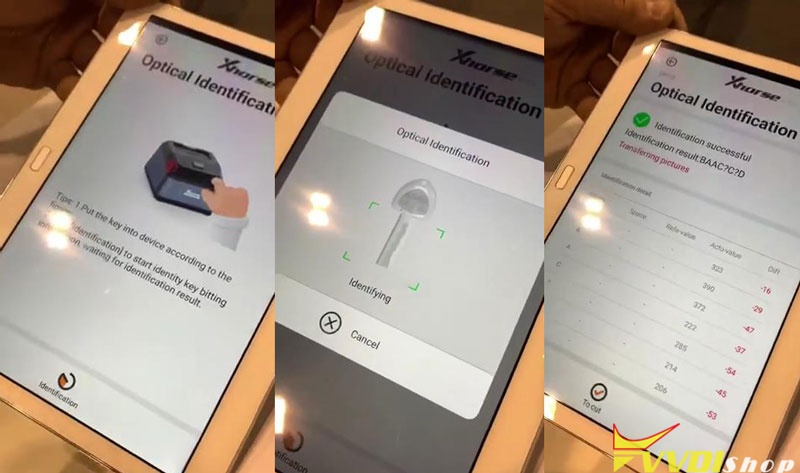
Optical identification >> Fiat >> All key blank >> SIP22 >> OK >> Identification

Xhorse Key Reader Decodes Fiat SIP22 Bitting 1

Xhorse Key Reader Decodes Fiat SIP22 Bitting 2

  1. Put the key into Key Reader device according to the figure.
  2. Click “Identification” to start identify key bitting information, waiting for identification result.


Key Reader will starts identifying automatically…


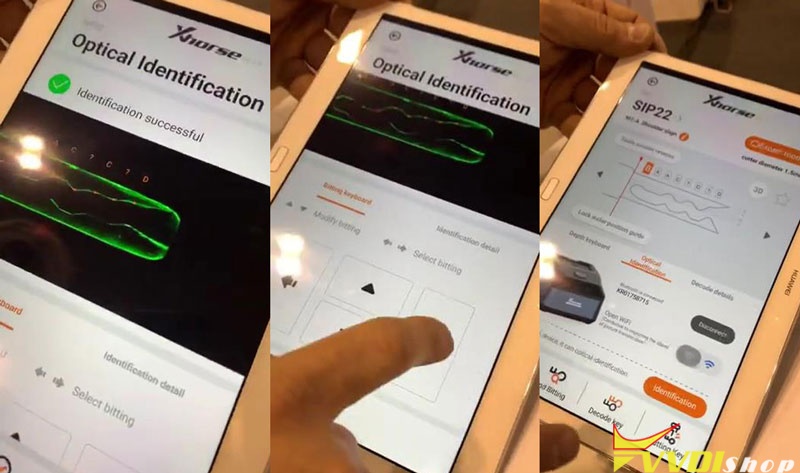
Identification successful.

It gives all bitting info details you’ll need.

You’re allowed to select bitting and modify bitting here as well.


Press “To cut”.

The bitting codes were displayed.


You can cut the key directly if having connected with a Dolphin XP005/ Dolphin II XP005L already.

Xhorse Key Reader Decodes Fiat SIP22 Bitting 3

Xhorse Key Reader Decodes Fiat SIP22 Bitting 4


Quite an easy and wonder little device!

www.vvdishop.com

10/28/2021

Xhorse Condor V1.5.6 fix M4 Clamp Decoding

 Xhorse Dolphin and Condor firmware V1.5.6 fixed M4 Clamp Decoding issue.

V1.5.6 (2010-10-28)

This version need to update the firmware.

Fix universal key duplication about M4 clamp decoding.

Xhorse Condor V1.5.6 fix M4 Clamp Decoding