8/20/2024

Xhorse Dolphin XP005L HU101 Recommend to Use 1.5mm Cutter?

 Problem:

I try and cut a HU101 blade with Xhorse Dolphin XP005L. It asks to use 1.5mm cutter tho it cuts it perfectly with a 2.5mm cutter. Then I put a 1.5mm cutter in and it instantly Broke it in half. Any clue?

Xhorse Dolphin XP005L HU101 Recommend to Use 1.5mm Cutter

Solution:

Usually 2.5mm cutter works fine on HU101 blade.  But not always work with 2.5mm depending on the key bitting if you have a deeper cut between 2 low cuts you see why the machine recommends the 1.5mm cutter.

If you break a cutter, you need to calibrate the cutter and let machine know you have changed sizes or it will break.  When you change cutter you have to calibrate it again.

1mm diference machine doesn’t know about.


www.vvdishop.com

How to Solve Dolphin XP005L Error Code 5?

 If you had error code 5 when cutting key with Xhorse Dolphin XP005L key cutting machine (error images shown below), here is the possible solution.

Dolphin XP005L Error Code 5 1

Dolphin XP005L Error Code 5 2

Dolphin XP005L Error Code 5 3

Solution:

Remove those 3 screws set from probe base.

Dolphin XP005L Error Code 5 solution 1

Check the small wire and clean up iron filings.

Dolphin XP005L Error Code 5 solution 2

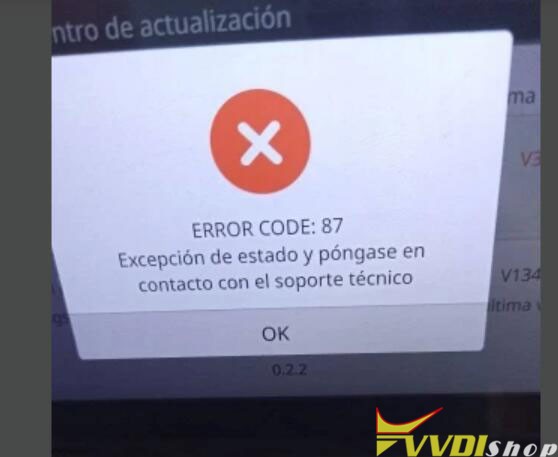
How to Solve Xhorse Dolphin XP005L Error Code 87?

 Problem:

When turning on the Xhorse Dolphin XP005L key cutting machine it asks for an update. updated to 99% it says network error. the network is fine.
It cannot charge battery only via power supply and also displays error code 87. Any solution?
Xhorse Dolphin XP005L Error Code 87 1

Xhorse Dolphin XP005L Error Code 87 2

Xhorse Dolphin XP005L Error Code 87 3

Solution:

Unplug this green cable on the battery, then run an update. Plug the green cable after the upgrade is finished.

Xhorse Dolphin XP005L Error Code 87 solution

8/05/2024

How to See Xhorse Dolphin XP005 Battery Information?

 How to Check Xhorse Dolphin XP005/XP005L Battery Information?


In Xhorse App, go to Device Information->Key Cutting-> Power->Check battery information

Need to connect dolphin with Xhorse App to read battery information.

See Xhorse Dolphin XP005 Battery Information 1

See Xhorse Dolphin XP005 Battery Information 2

If it is XP005L, you can check battery information on the App or in the device (go to Battery information).

See Xhorse Dolphin XP005 Battery Information 3

If the battery cannot charge or has other problems, do following:

1. Take a video of power on and off and send to us

2. Send a screenshot of battery information

3. If cannot read battery information, follow this way to test battery voltage and send test results to us.

See Xhorse Dolphin XP005 Battery Information 4

See Xhorse Dolphin XP005 Battery Information 5

See Xhorse Dolphin XP005 Battery Information 6

The Xhorse engineer will check if battery needs replacement.

https://www.vvdishop.com/service/replace-xhorse-dolphin-xp005-battery.html

7/16/2024

How to Solve Dolphin XP005L Calibration Error Code 6

 Problem:

One of our customers failed to calibrate the Xhorse Dolphin XP005L key cutting machine. The dolphin ii reported error code 6 during the calibration process.

Dolphin XP005L Calibration Error Code 6 1

Dolphin XP005L Calibration Error Code 6 2

Possible solution:

Open the back cover and adjust the X-axis sensor or baffle.

Dolphin XP005L Calibration Error Code 6 3

Dolphin XP005L Calibration Error Code 6 4

User feedback:

He checked and found this part is broken.

Dolphin XP005L Calibration Error Code 6 5

Final solution:

Need to replace the X-axis sensor.

Better replace the sensor of other axes to the X-axis and do an X-axis motor test first to see if there are any other problems.

Then send the test result to us.


www.vvdishop.com

7/10/2024

How to Measure Xhorse Dolphin XP005 Battery Voltage?

 We have already shown how to remove the shell and test the battery voltage for Xhorse Dolphin XP005/XP005L key cutting machine.  Some people don’t know how to measure voltage.


Here we will show how to measure battery voltage in detail.

It’s best to take photos to ensure that the gear and pins are correct.

  1. Select DC power supply gear, please measure the voltage of these two pins of the battery on the picture below and send us the test result.

Measure Xhorse Dolphin XP005 Battery Voltage 1

2. Please measure the voltage of these two pins of the mainboard follow the step below and send us the result.

Measure Xhorse Dolphin XP005 Battery Voltage 2
First, unplug these two cable on the motherboard
Measure Xhorse Dolphin XP005 Battery Voltage 3
Turn the multimeter to this setting (Diodegear)

Measure Xhorse Dolphin XP005 Battery Voltage 4
Measure the volts of these two pins, and take us a photo like this.

Measure Xhorse Dolphin XP005 Battery Voltage 5

and measure these other two pins value.
(Note the color of the meter pens in the diagram)
www.vvdishop.com

7/08/2024

How to Use Xhorse Condor Dolphin Modify Key Function

 Xhorse Condor/Dolphin XP005 key cutting machines have built-in Modify key (Modify Common Key) function that many people did not notify.


When do you need this feature?

Let’s say you’re on a job, and you’re out of blank you need. You know you have keys larger and just wish that your machine could mill down one to the size you need.

It is a feature that is BUILT-IN in Condor/Dolphin!


How to use this feature?

Click ‘Cut by Bitting’. Top right button ‘Modify key’. You can search or look through their info.

Xhorse Condor Dolphin Modify Key Function

A Dolphin user just tested out a KLR key. These aren’t made available yet and the only source has been eday. It just milled down a DAT17 to KLR specs! It’s ready to be cut now! This might only be for high security keys, but it’s something!

 
This can be done with so much more! And you could even mill down flip keys to something you need! It’s a reason you may want to stock a micrometer with metric next to your key machine.


This feature is available on both new and old Condor or dolphins.

www.vvdishop.com