2/07/2022

How to Update Xhorse Condor II Key Cutting Machine?

 To update the previous Xhorse condor mini, condor mini plus, dolphin xp005, xp005l key cutting machines, you should download Xhorse upgrade kit and update machines on PC via USB connection. But the new xhorse condor xc-mini plus II (Condor II) allows users to update the system, app, firmware and database on the machine directly without PC. 

Update Xhorse Condor II  1

It is much easier and more intuitive for anyone using the condor key cutting machine.

Make sure you have WiFi network connected

Enter Update Screen

Connect machine with WiFi

Update Xhorse Condor II  2

Update Xhorse Condor II 3

Update Xhorse Condor II 4

Update Xhorse Condor II 5

Enter update screen again
Press ‘Update’ and wait a few seconds

Update Xhorse Condor II 6

Update Xhorse Condor II 7

Update Xhorse Condor II 8

Update Xhorse Condor II 9

Upgrade success, the xhorse condor ii will restart and load new firmware/software/database automatically.


https://www.vvdishop.com/service/update-xhorse-condor-ii-software-and-software.html

1/19/2022

How to Connect Xhorse Condor/Dolphin with Key Reader?

 Question: how to connect the new xhorse dolphin xp005l with key reader?


Here’s the tips to connect xhorse key reader with condor/dolphin key cutting machine:

Dolphin XP005Dolphin XP005LCondor Mini Plus connects key reader via Xhorse app on mobile phone

The new Condor XC-Mini Plus II connects with key ready directly without mobile phone.


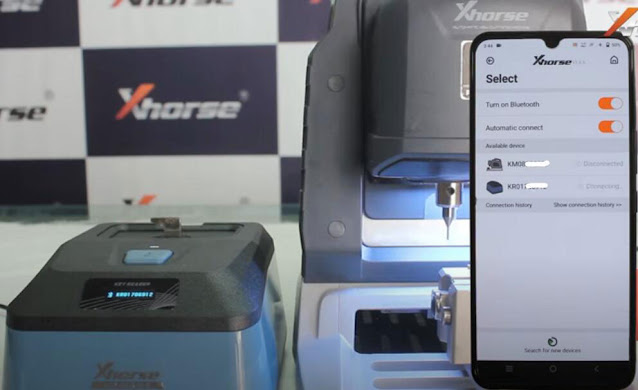
Connect key reader with Xhorse App via WiFi or Bluetooth:

Turn on both xhorse key reader and dolphin/condor
Turn on Bluetooth connection on xhorse app
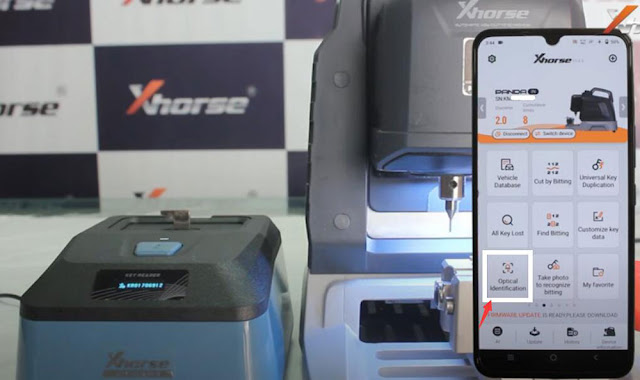
In xhorse dolphin/condor app, press Select, let it seach devices. You will see 2 devices are connected
Select Optional identification function in the Xhorse app
Select brand and start using key reader

Connect Xhorse Condor/Dolphin with Key Reader 1

Connect Xhorse Condor/Dolphin with Key Reader 2

Connect Xhorse Condor/Dolphin with Key Reader 3

Demo guide & review: http://blog.vvdishop.com/xhorse-key-reader-review-identify-7-car-keys-fast/

Connect key reader with Condor II within machine instruction will be updated soon.

1/16/2022

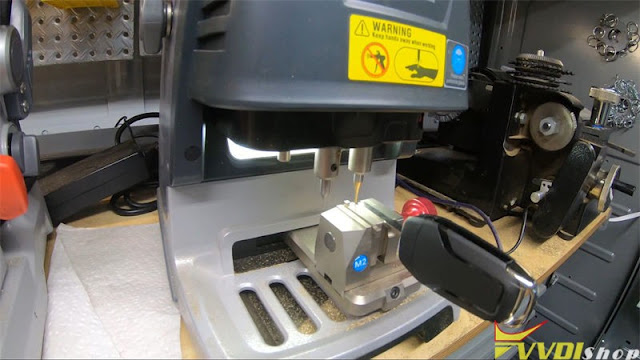
Dolphin XP005 Decode & Copy Ford HU101 with Xhorse Key Reader

 How to use Xhorse Key Reader + Dolphin XP005 to decode & duplicate a flip key for 2017 Ford F250? Follow the operation below I’m gonna show you.

Dolphin XP005 Decode & Copy Ford HU101 1

Dolphin XP005 Decode & Copy Ford HU101 2

Prepare a Ford working key.

Connect to Dolphin XP005 in Xhorse app, click

Optical identification >> Ford >> All key blank >> HU101 >> OK

Install M2-A clamp & key blank as prompted.


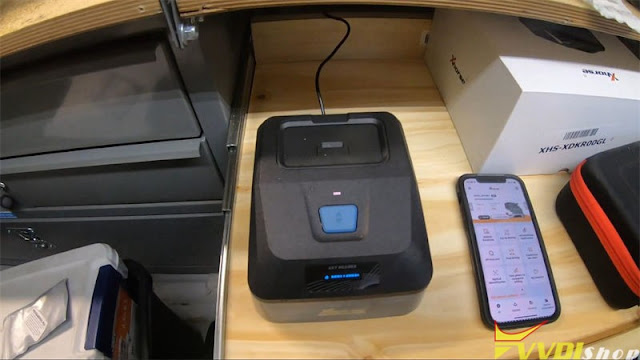
Connect to Key Reader Skimmer.

Open Key Reader key slot to insert the key.

Click “Identification”.

Key Reader will start reading…


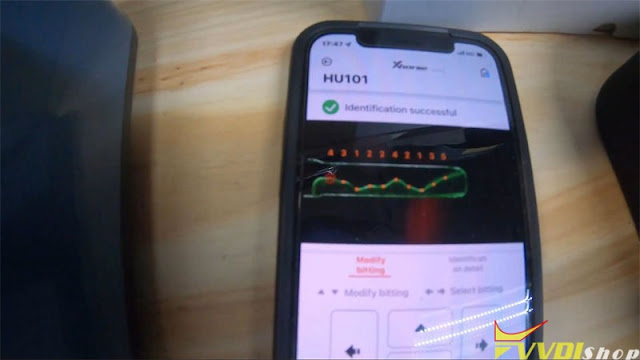
Identification successful.

Key bitting: 4312242135.

It actually sends a picture of the key, so we can take a look at it.

Visually inspect to make sure that Key Reader read it right.

Everything looks good, bitting codes are accurate.


So we can go ahead and send it to Dolphin XP-005 Machine for cutting directly.

Click “Cutting key >> Cut”.

Dolphin XP005 starts cutting…

Just repeat same command to cut the other side.

Dolphin XP005 Decode & Copy Ford HU101 3

Dolphin XP005 Decode & Copy Ford HU101 4

Dolphin XP005 Decode & Copy Ford HU101 5

Dolphin XP005 Decode & Copy Ford HU101 6

After cutting was done.

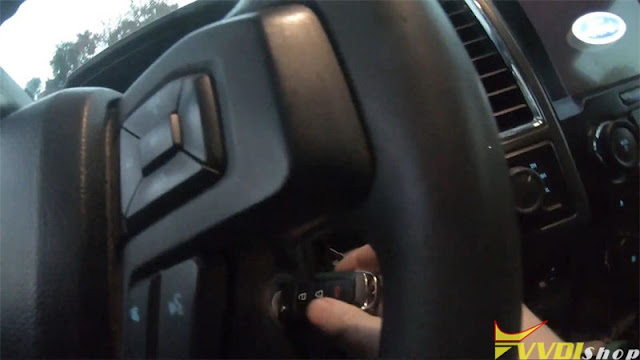
Take out the key to have a try.

It can open the truck door and turn ignition.

Perfectly done!

Dolphin XP005 Decode & Copy Ford HU101 7

Dolphin XP005 Decode & Copy Ford HU101 8

This is using the new Xhorse Key Reader blade skimmer to copy a HU101 10 cuts blade successfully.

www.vvdishop.com

12/21/2021

How to Fix Xhorse Condor XC-Mini Date Reset Problem?

 Problem:

My old xhorse condor xc-mini key cutting date reset. The date is reset every time I turn on the power. It doesn’t come up right away. Any idea?
Fix Xhorse Condor XC-Mini Date Reset 1

Fix Xhorse Condor XC-Mini Date Reset 2

Solution:
Unscrew 3 screws marked red below, remove condor screen and shell.
The main board is on the left side, unscrew another 3 screws to take out main board
Fix Xhorse Condor XC-Mini Date Reset 3

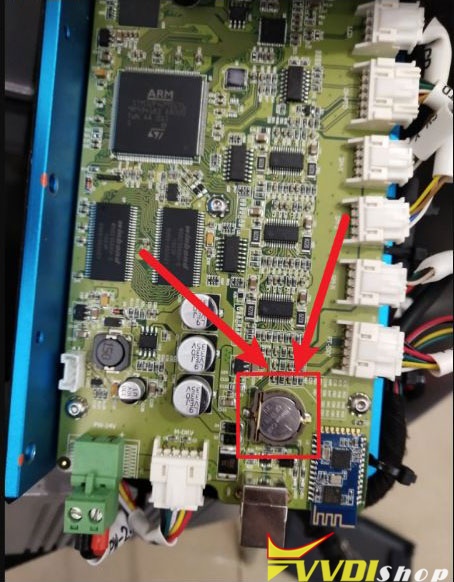
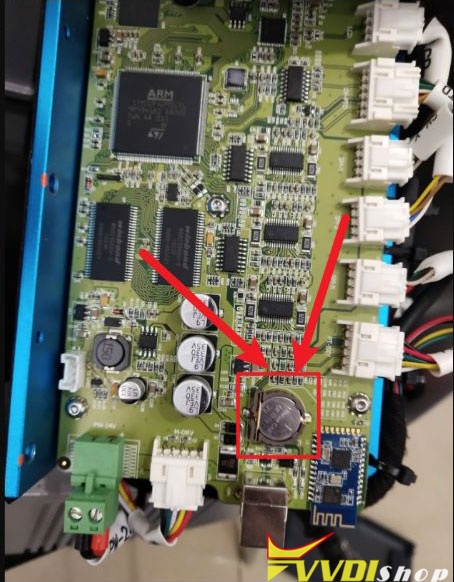
Find out battery CR1220, replace a new battery.
For example, the battery of condor mini plus (S/N KM02 and KM03) is on the right side of the board (shown image below)
Reinstall shell and screen after replace battery.
Fix Xhorse Condor XC-Mini Date Reset 4
Go to System setting, set date to the current time. It should be fine.
https://www.vvdishop.com/service/xhorse-condor-xc-mini-date-reset-problem-solution.html

12/14/2021

Duplicate Mul-T-Lock Dimple Key by Condor Mini Plus II

 Xhorse Condor XC-Mini Plus II can support to duplicate mul-t-lock dimple household key successfully. Read the operation below to learn how to do it.


Tools Needed

1.0mm probe

Dimple internal cutter/ Dimple external cutter

M5 clamp

An original key


Procedure

Step1. 1st Time Height Calibration

  1. Install the probe and the dimple internal cutter, fix the clamp tightened;
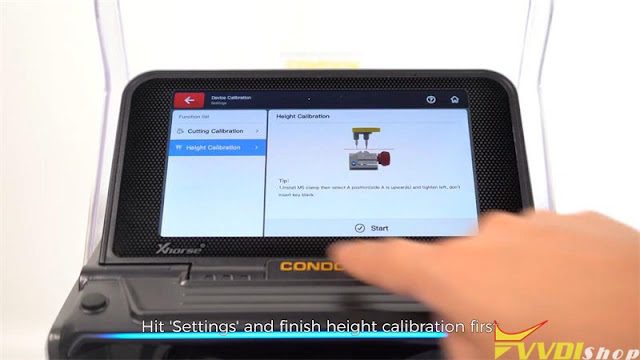
  2. Tap “Settings >> Device Calibration >> Height Calibration >> Start”.

Duplicate Mul-T-Lock Dimple Key by Condor Mini Plus II 1

Duplicate Mul-T-Lock Dimple Key by Condor Mini Plus II 2

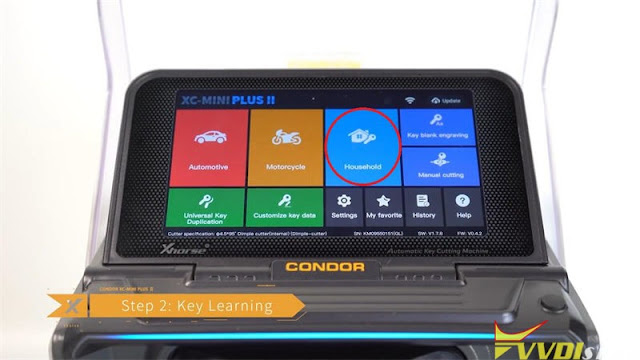
Step2. Key Learning

  1. Tap “Household >> Key Brand & Model”;
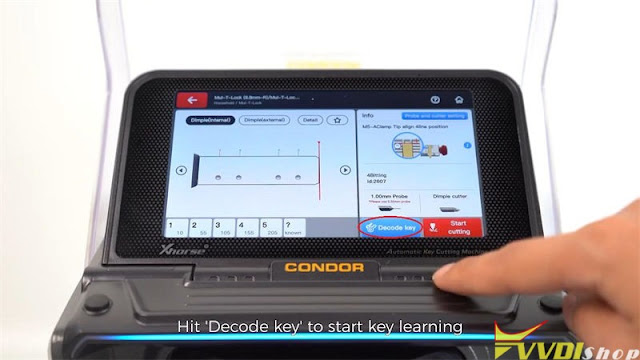
  2. Fix the original key on M5 clamp, tap “Decode key” to start.

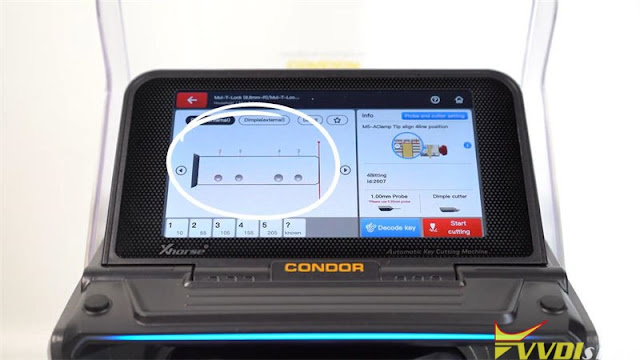
The Condor Mini Plus II screen will show bitting details after finished.

Duplicate Mul-T-Lock Dimple Key by Condor Mini Plus II 3

Duplicate Mul-T-Lock Dimple Key by Condor Mini Plus II 4

Duplicate Mul-T-Lock Dimple Key by Condor Mini Plus II 5


Step3. Key Cutting

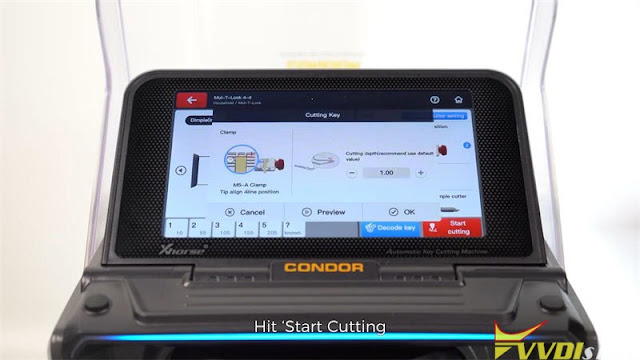
  1. Change blank key to fix it on, close the cover, tap “Start Cutting >> OK”;
  2. Turn over the key blank to cut, just repeat previous operations.

Duplicate Mul-T-Lock Dimple Key by Condor Mini Plus II 6

Duplicate Mul-T-Lock Dimple Key by Condor Mini Plus II 7

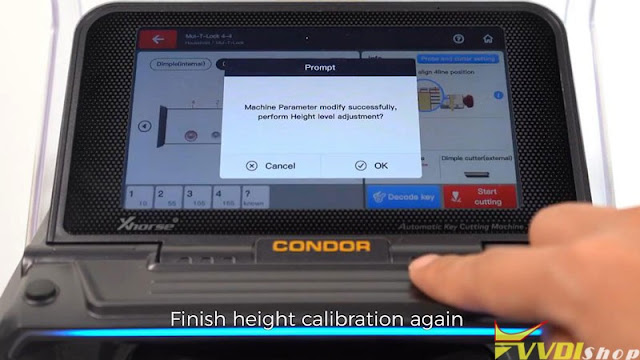
Step4. 2nd Time Height Calibration

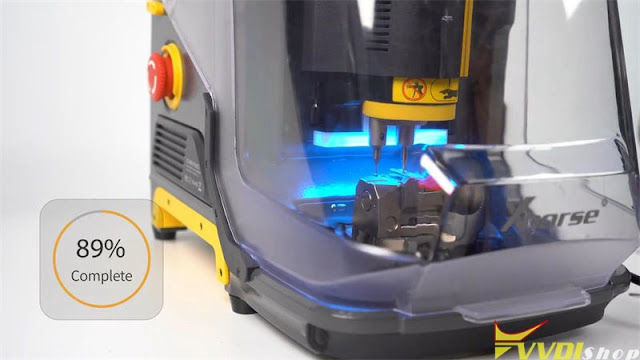
  1. Clean and remove the key. Tighten M5 clamp and install the dimple external cutter.
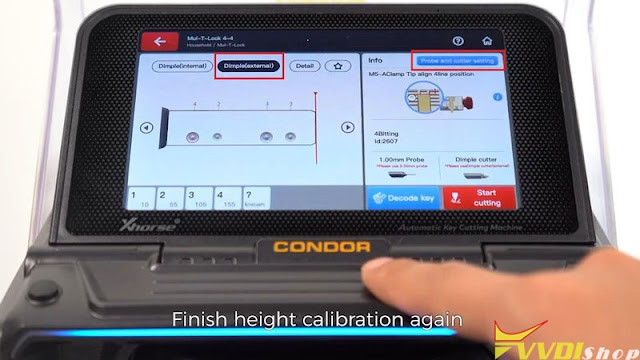
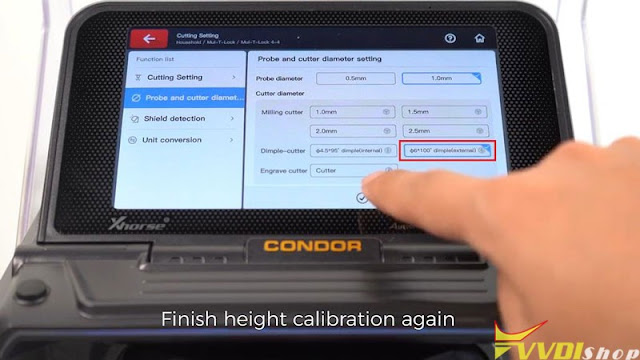
  2. Tap “Dimple(external) >> Probe and cutter setting >> φ6*100*dimple(external) >> Save”.

Duplicate Mul-T-Lock Dimple Key by Condor Mini Plus II 8

Duplicate Mul-T-Lock Dimple Key by Condor Mini Plus II 9

Duplicate Mul-T-Lock Dimple Key by Condor Mini Plus II 10

Step5. Cut External Cuts

  1. Fix the half-cutting key on clamp again, tap “Start cutting >> OK”;
  2. Turn over key to cut the other side.


Key cutting completed.

Compare 2 keys, all bittings are same. And the new key can open lock.

Done!

Duplicate Mul-T-Lock Dimple Key by Condor Mini Plus II 11

Duplicate Mul-T-Lock Dimple Key by Condor Mini Plus II 12

More info about Condor Mini Plus II Key Cutting Machine to be updated…

www.vvdishop.com

12/12/2021

Xhorse Dolphin XP005L Decode & Cut VW HU66

 This is an Xhorse Dolphin XP005L Review for the first time to cut a VW HU66 key. I have an original working key, so will test its decode function as well.


Power on Dolphin XP005L machine, there’s a line of light is awaken. Go to

Vehicle database >> Volkswagen >> All key blank >> HU66


Align M5 clamp side B as prompted.

Fix the VW working key on.

OK >> Learn key


Dolphin II machine starts decoding…

The blue light is normally on that means it’s working.

Wait decoding key complete.


Remove the key, and fix a blank key on.

Cut key >> Cut

Xhorse Dolphin XP005L Decode & Cut VW HU66  1

Xhorse Dolphin XP005L Decode & Cut VW HU66  2

Xhorse Dolphin XP005L Decode & Cut VW HU66 3

Dolphin II machine starts cutting.

Just wait…


Cutting key completed.

Clear the debris and turn over the key to cut other side.

Once again as previous.


Once cutting was done, take out the key to compare.

It’s same as the original one.

Xhorse Dolphin XP005L Decode & Cut VW HU66 4


Dolphin II XP005L is quite a smart and easy Xhorse Key Cutting Machine. The HU66 key cutting turns out to be accurate and workable.

www.vvdishop.com

12/05/2021

Xhorse Condor Mini Plus II Engraves a Unique Key Blank

 Key blank engraving is an optional cutter newly developed for Xhorse Condor XC-Mini Plus II key cutting machine. The cutter allows locksmiths to engrave a unique key as need. It supports to engrave numbers, letters and simple patterns.


The older model such as Condor Mini Plus or Dolphin XP005 is not available for this feature currently.


How to engrave a unique key blank?

Step1. Insert the engraving cutter and key blank.


Install the key blank on M5 clamp.

The vertex cannot be occluded by the key blank.

Please use special engraving cutter.

Xhorse Condor Mini Plus II Engraves a Unique Key Blank 1

Xhorse Condor Mini Plus II Engraves a Unique Key Blank 2

Step2. Send the picture to be cut to Condor XC-Mini Plus II.

  1. Pair XC-Mini Plus II with smartphone via Bluetooth(Bluetooth >> Pair new device);
  2. Ensure the picture is in PNG format with transparent background;
  3. Select picture to send.

Xhorse Condor Mini Plus II Engraves a Unique Key Blank 3

Xhorse Condor Mini Plus II Engraves a Unique Key Blank 4

Step3. Choose the picture and start to engrave.

Key blank engraving >> OK >> Add pictures >> Adjust the image to appropriate position

You can adjust its engrave spacing & engraving depth.

Xhorse Condor Mini Plus II Engraves a Unique Key Blank 5

Xhorse Condor Mini Plus II Engraves a Unique Key Blank 6

Xhorse Condor Mini Plus II Engraves a Unique Key Blank 7

Press “Start engraving” after finished.

Note: the first dot engraved will start from the highest point on the left of image.


Condor Mini Plus II will starts engraving automatically.

Just wait…

Engraving completed.

Xhorse Condor Mini Plus II Engraves a Unique Key Blank 8

Xhorse Condor Mini Plus II Engraves a Unique Key Blank 9

This is how to use Condor XC-Mini Plus II machine to do key blank engraving function.


You may interest:

What’s new in Xhorse Condor XC-Mini Plus II?

http://blog.vvdishop.com/what-is-new-in-xhorse-condor-xc-mini-plus-ii/


More info to be updated…